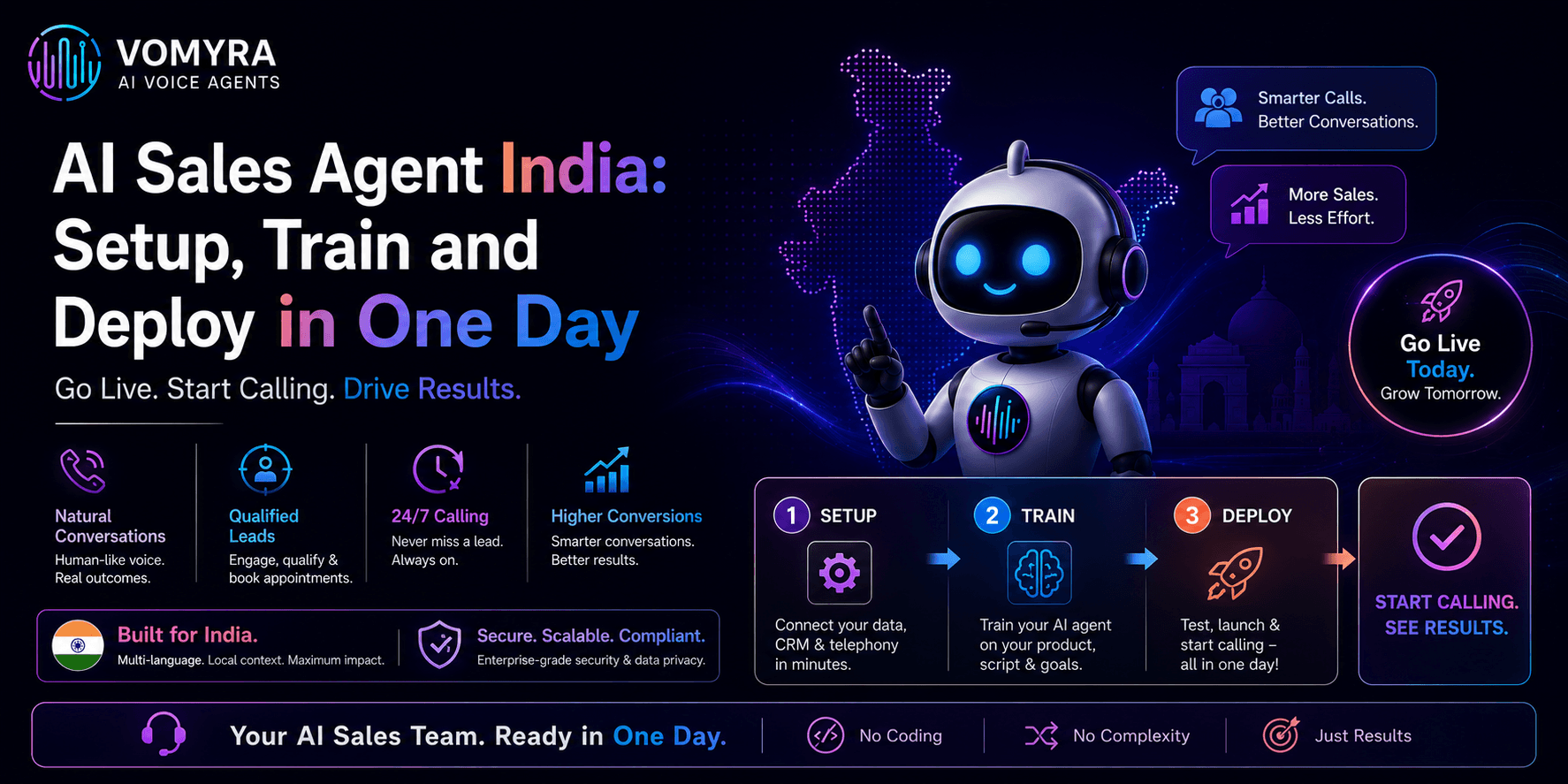
Most Indian businesses assume that deploying an AI sales agent is a weeks-long project involving a developer, an API integration, a testing phase, and a slow rollout. For developer-first platforms, that assumption is accurate. For a no-code platform built specifically for the Indian market, it is not.
A business that decides to deploy an AI voice sales agent on a Monday morning can, with the right platform and a focused half-day of configuration, have that agent answering real calls and qualifying real leads by the same afternoon.
This guide walks through exactly how that happens with Vomyra AI Voice Agent — what to prepare before you start, what to configure during setup, how to train the agent on your specific product or service, and what to verify before going live. It is written for the business owner, sales manager, or operations lead who will do this themselves, without a technical team.
Why One Day Is Realistic
The reason deployment used to take weeks was infrastructure. Connecting a speech recognition engine, a language model, a voice synthesis layer, and a telephony provider required engineering work at every seam. Each piece had to be configured, tested, and connected before a single call could be made.
A no-code platform collapses that infrastructure into a single interface where business-level decisions — what should the agent say, what questions should it ask, which language should it speak, where should leads go — are the only things that need to be made.
One day is realistic not because corners are being cut, but because the technical work has already been done by the platform. The business’s job is configuration, not construction.
Before You Start: What to Prepare

Thirty minutes of preparation before opening the platform saves hours of rework during setup.
Define the agent’s single job. The most common setup mistake is trying to make the agent do everything on day one. Pick one workflow: either inbound call handling, outbound lead qualification, or appointment follow-up.
Not all three. A focused agent configured well outperforms a broad agent configured hastily, and it is far easier to measure whether it is working. The workflow you pick should be your highest-volume, most repetitive call type — the one your team handles on autopilot because every call follows the same pattern.
Write out the five to eight questions your best caller asks. Not a full script — just the core qualifying questions. For real estate: what is your budget, which area are you looking in, are you buying for self-use or investment, when are you planning to purchase? For fintech: what type of loan are you looking for, what is your monthly income, are you salaried or self-employed? For a restaurant: for how many people, what time, do you have any dietary preferences? These questions become the backbone of the agent’s conversation logic.
Gather your product information. The agent needs to answer the questions callers actually ask. Compile a short document: pricing, availability, key features, coverage areas, common objections and how you handle them. This does not need to be formal — a WhatsApp message you normally send prospects works fine. The point is having it ready to paste in during training.
Decide on your human escalation trigger. Every well-configured agent has a clear rule for when to hand off to a human. “Transfer to a human if the caller asks to speak to someone” is the minimum.
Better: “Transfer if the caller has confirmed budget, timeline, and location” — i.e., when the lead is qualified and ready for a real conversation. Know this before you start configuring.
Have your CRM or lead sheet ready. Decide where qualified lead data should go. This can be a CRM like Zoho or LeadSquared, a Google Sheet, or a WhatsApp notification to the sales team. You do not need a complex integration on day one — even a simple notification path ensures leads captured by the agent actually reach someone.
Morning: Setting Up the Agent (Two to Three Hours)
Create the account and select your use case. Vomyra offers pre-built templates for the most common Indian SMB use cases — real estate lead qualification, restaurant order-taking and reservations, fintech loan inquiry, healthcare appointment booking, and others. Starting from a template rather than a blank canvas saves an hour of configuration.
Select the template that most closely matches your workflow. You will customise it immediately, but the conversation structure, the default questions, and the escalation logic are already built in.
Set the language and voice. Choose the primary language your customers call in. Hindi, Hinglish, Tamil, Telugu, Marathi, Gujarati, Bengali, and Punjabi are all available natively. For most urban Indian businesses, Hinglish is the right starting point — the agent handles mid-sentence switches between Hindi and English without breaking, which matches how most Indian callers actually speak.
Choose a voice tone that fits your business: a real estate agent warrants a different register than a quick-service restaurant. Listen to the samples before choosing.
Configure the conversation flow. This is where your five to eight qualifying questions from the preparation phase go in. Vomyra’s no-code interface lets you add, reorder, or remove questions without touching any code.
For each question, set what should happen depending on the answer — if the caller says their budget is below a threshold, route differently than if it is above. If the caller asks a question not in the script, set a fallback response. If the caller asks to speak to a person at any point, trigger the human handoff immediately.
Connect the phone number. Assign a +91 Indian number to the agent. This is the number you will give leads, post on your portal listings, or route your existing inbound calls to.
For outbound campaigns, this is the number that will appear on the caller’s screen when the agent dials out. Indian customers are significantly more likely to answer a call from a +91 number than from an unrecognised international number — this alone increases outbound pickup rates meaningfully.
Set the escalation path. Define the human handoff destination: a specific mobile number, a team’s number, or a queue. When the agent decides to transfer — either because the lead is qualified and ready, or because the caller has asked to speak to a person — this is where the call goes. Configure it now, before training, so the path is live from the first test call.
Midday: Training the Agent on Your Business (One to Two Hours)
Training the agent does not involve data science or model fine-tuning. It means giving it accurate, specific information about your business so it answers caller questions correctly instead of giving generic responses.
Paste in your product or service information. Use the knowledge base section to add the information you prepared earlier: pricing, availability, project details, menu items, loan products, appointment types, or whatever your callers ask about most.
Write it the way you would explain it to a new joiner — clear, accurate, and in plain language. Avoid marketing copy; the agent needs factual information it can retrieve and state accurately, not promotional language it will awkwardly recite.
Add answers to your most common questions. Every business has five to ten questions that come up on almost every call. For a real estate developer: is the project RERA registered, what is the possession date, is home loan available?
For a restaurant: what are your hours, do you do home delivery, is there parking? Add these question-and-answer pairs directly. The agent will use them to answer callers without having to guess or fall back to a generic response.
Set location-specific and language-specific details. If your business serves a specific region, add the relevant local context. Area names, nearby landmarks, local payment methods, or regional product variants that callers from that geography typically ask about.
An agent that knows the local context sounds like someone who actually works there, which builds caller confidence faster than a polished but generic response.
Run internal test calls. Call the agent yourself, from a mobile number, before showing it to any real customer. Ask the questions a real caller would ask.
Try to break it: ask something it is not trained on, switch languages mid-call, give a deliberately ambiguous answer to a qualifying question. Every failure in a test call is a failure you prevent in a live call. Spend forty-five minutes testing before you go live. This is the most important part of the entire day.
Afternoon: Going Live and Monitoring the First Calls (One Hour Setup, Ongoing)
Update your lead sources with the new number. If you are using the agent for inbound calls, update the phone number on your property portal listings, your Google Business Profile, your restaurant’s Swiggy and Zomato pages, your website contact page, or wherever callers currently find your number. If you are running an outbound campaign, upload your lead list and schedule the first batch.
Set your calling hours. For outbound calls, configure the agent to operate within TRAI’s permitted window of 9 AM to 9 PM. For inbound, the agent can operate 24 hours — but decide in advance what should happen to calls that come in after hours when your human team is unavailable.
The agent can answer, qualify, and hold the lead for a morning callback. Make sure that path is configured before you go live.
Monitor the first ten calls manually. Vomyra AI Voice Agent logs every call with a full transcript and a summary of the outcome. Check the first ten calls yourself. Look for: questions the agent answered incorrectly, callers who dropped off at a specific point in the conversation, escalations that triggered at the wrong moment, and any language or phrasing that sounded unnatural in context.
Most adjustments needed after the first live calls are small — a rephrased question, an added FAQ answer, a reconfigured escalation trigger.
Set your lead notification. Confirm that every qualified lead captured by the agent is reaching the right person. Check that the CRM record, the Google Sheet row, or the WhatsApp notification is arriving with the correct information: caller name, phone number, key qualifying answers, and timestamp.
This is the handoff point between the AI and your human sales team. If it is not working correctly on day one, fix it before the lead volume grows.
What Happens After Day One
A well-configured agent improves over the first week as edge cases surface. The first few live calls will reveal questions you did not anticipate, objections not in the knowledge base, and caller patterns you did not see in the test phase. Every gap identified and closed makes the agent more effective on the next hundred calls.
Vomyra AI Voice Agent provides full call transcripts, qualification summaries, and drop-off analytics so you can see exactly where conversations are working and where they are losing callers.
Use the first week’s data to refine qualifying questions, add unanticipated FAQ answers, and adjust escalation triggers based on real caller behaviour rather than assumptions.
By the end of the first week, most businesses have a stable agent configuration that handles its core workflow without requiring ongoing attention.
The human sales team receives warm, pre-qualified leads instead of spending time on cold dials and repetitive information calls. After-hours coverage that previously meant missed leads now means captured, logged, and ready-to-call-back prospects every morning.
The one-day deployment is not the end of the process — it is the beginning of a feedback loop that improves over time. The agent is live, handling calls, and the sales team is spending their time on conversations that actually require a human.
Start the setup with a free trial on Vomyra — no payment required until you have seen the agent work on your actual call volume.
Frequently Asked Questions
Do I need technical skills to set up Vomyra AI Voice Agent?
No. The entire setup — conversation flow, language selection, knowledge base, phone number, CRM connection, and escalation path — is done through a visual interface. No coding, no API work, and no developer involvement is required.
What if my callers switch between Hindi and English mid-conversation?
Vomyra handles Hinglish code-switching natively, meaning the agent follows mid-sentence language switches without breaking or asking the caller to repeat themselves. This is built into the core platform, not configured separately.
How many calls can the agent handle simultaneously?
There is no fixed limit on concurrent calls. Unlike a human team where each caller occupies one person, the AI handles multiple calls at the same time. This is particularly valuable during peak hours — a restaurant dinner rush, the hour after a real estate ad goes live, or a morning after a digital campaign — when human teams are most likely to miss calls.
What happens when a caller asks something the agent has not been trained on?
The agent falls back to a configured default response — typically “Let me connect you with someone from our team” — and triggers the human escalation path. It does not guess or fabricate an answer. This is why the escalation configuration in the setup phase matters.
Can the agent be updated after it goes live?
Yes, at any time, without taking it offline. If a price changes, a new product launches, or a qualifying question needs to be reworded, the update is made in the knowledge base or conversation flow and applies immediately to all subsequent calls.