Who This Guide Is For
This is for developers and technical founders who want to trigger outbound AI voice calls directly from their own applications, rather than launching campaigns from the Vomyra dashboard.
If your CRM should automatically call new leads the moment they are created, if your fintech platform should initiate loan inquiry follow-ups when a form is submitted, if your real estate system should reach portal leads within 60 seconds of an inquiry, or if your healthcare application should fire appointment reminders from a patient database, the Vomyra API is what makes that happen.
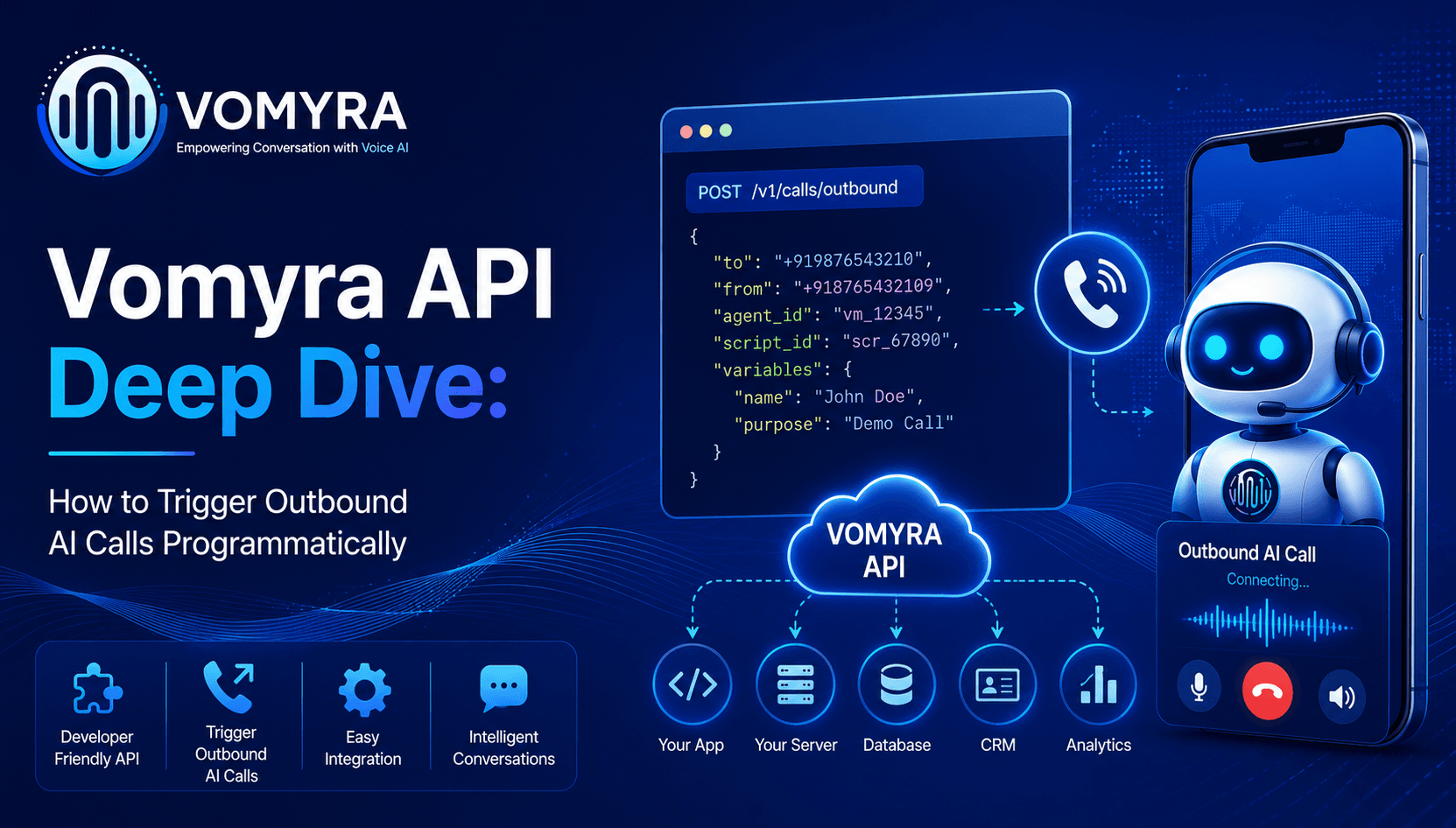
Vomyra AI Voice Agent exposes a standard REST API that allows any backend application to initiate outbound calls, inject dynamic variables into the conversation, retrieve call transcripts and qualification outcomes, manage agent configurations, and receive structured call data through webhooks.
The API uses JSON for all requests and responses, authenticates through bearer tokens, and requires no SDK, no separate telephony provider account, and no Indian phone number procurement process outside of Vomyra itself.
The base URL for all API requests is the Vomyra API endpoint. Your API key, which acts as the bearer token for every request, is available in the Vomyra dashboard under Settings and then API Keys. Keys can be scoped to specific permissions: read-only for transcript retrieval, write-level for call initiation, and admin-level for agent configuration changes.
The Three Core Objects: Agents, Calls, and Webhooks
Before triggering a call, it helps to understand the three objects the Vomyra API is organised around. Every API interaction involves one or more of these.
An Agent is the configured AI voice assistant that conducts the actual conversation. It contains the conversation flow, the knowledge base, the language settings, the qualification script, and the escalation logic. Agents are created once and reused across thousands of calls. Each agent has a unique identifier that you reference every time you trigger a call.
A Call is a single voice interaction triggered through the API. When you send a call request, you specify which agent conducts the conversation, which number to dial, which language to use, and any dynamic variables to inject into the conversation. Vomyra returns a call identifier that you use to retrieve outcomes later.
Webhooks are the outbound notifications Vomyra fires to your configured endpoint when call events occur. Your server does not poll for outcomes. Vomyra pushes structured data to a URL you specify the moment each event fires: when the call connects, when it ends, when a lead qualifies, and when a transfer to a human agent is triggered.
This event-driven model is what makes the integration feel real-time rather than batch.

The Call Request: What You Send and Why Each Field Matters
When your application sends a call initiation request to Vomyra, the request body contains several fields that determine how the call runs.
Agent identifier is required. This tells Vomyra which configured agent conducts the conversation. The agent’s entire personality, script, qualification logic, and knowledge base are determined by this single value. If you have separate agents for real estate lead qualification versus fintech loan inquiry, you specify the appropriate one per call.
Destination number is required. This is the Indian mobile number to call, in the standard international format with the plus-91 country code prefix followed by the ten-digit number.
All outbound calls from Vomyra use Indian plus-91 numbers as the caller ID, which is one of the factors that produces substantially higher answer rates on Indian mobile networks compared to international or unrecognised numbers.
Language is optional but important. You can specify a language per call, overriding the agent’s default. Supported values cover Hindi, Hinglish for mid-sentence code-switching between Hindi and English, Tamil, Telugu, Marathi, Gujarati, Bengali, Punjabi, Assamese, and English.
If you set language to auto, Vomyra detects the caller’s language from their first response and continues in that language for the rest of the conversation, handling Hinglish code-switching natively.
For campaigns targeting multiple states, setting language per lead based on city or name pattern and falling back to auto for ambiguous cases is the recommended approach.
Variables are optional but transformative. This is where you inject personalisation that turns a generic script into a contextual conversation. Any key-value pair you pass here is available in the agent’s conversation using a reference syntax.
The agent can address the caller by name, mention the product they enquired about, reference the portal they came from, or acknowledge their stated budget. This personalisation applies throughout the entire conversation, not just the opening line.
Metadata is optional. Arbitrary key-value pairs you pass here are stored against the call record and included in webhook payloads.
The primary use case is passing your CRM’s lead identifier so that when the webhook fires after the call completes, your server can match the call outcome back to the exact CRM record without any lookup logic. Campaign name, source attribution, and segment tags are other common uses.
What Vomyra Returns Immediately
When your call request is accepted, Vomyra returns a call identifier and a status of queued. Status transitions from queued to ringing to in-progress to completed or failed. Your webhook receives a notification for each transition. The call identifier is what you use to retrieve the full outcome if you ever need to pull it programmatically rather than waiting for the webhook.
Bulk Outbound Campaigns Through the API
For situations where you need to call hundreds or thousands of leads from a list, the batch call endpoint is more efficient than sending individual call requests in a loop. The batch endpoint accepts an array of call objects under a single campaign request.
At the campaign level, you specify the agent, the default language, the calling hours window, the concurrency limit, and the retry configuration. At the per-call level inside the array, you specify the destination number, any language override for that specific lead, the variables to inject, and the metadata reference.
The calling hours parameter is where TRAI compliance is enforced automatically. Set the start time to 09:00 and the end time to 21:00 with the Asia/Kolkata timezone.
Any call that would be initiated outside this window is held in a queue and fired at the window’s next opening rather than being rejected. You do not need to build any scheduling logic in your application to enforce the calling window. Vomyra handles it.
The retry configuration determines what happens when a call is not answered or the number is busy. You specify the maximum number of attempts, which events trigger a retry, and how many minutes to wait before the retry.
A common configuration for lead qualification campaigns is two maximum attempts, retrying on no-answer and busy events, with a 45-minute gap between attempts.
The concurrency setting determines how many calls the campaign runs simultaneously. For most Indian business campaigns, a concurrency of 10 to 20 is a good starting point, scaling up based on the urgency of the campaign and the volume of the lead list.
The batch endpoint returns a campaign identifier and a per-call status array showing the initial status of each call in the campaign. Use the campaign identifier to retrieve progress and outcomes as the campaign runs.
Retrieving Call Outcomes
After a call completes, the full outcome is available through the call retrieval endpoint using the call identifier returned at initiation time.
The response contains everything your system needs to update the CRM without any additional API calls: the final call status, the duration in seconds, the detected language, the qualification score between 0 and 100, the full conversation transcript with timestamps, the structured question-and-answer pairs from the qualification flow, any escalation events that occurred during the call, and all metadata you originally passed when triggering the call.
For most production deployments, you do not call the retrieval endpoint directly. You configure a webhook and receive the same data pushed to your server the moment the call ends.
The retrieval endpoint is most useful for debugging, for manual audits, and for systems that need to pull historical call data in batches.
Webhook Architecture: Receiving Call Events in Real Time
Webhooks are the production-grade way to receive call outcomes. Rather than polling for results, your server registers a URL that Vomyra calls whenever a defined event occurs.
Registering a Webhook Endpoint
In the Vomyra API, you register a webhook endpoint by sending the URL you want to receive events, the list of event types that should trigger notifications, and a secret string used to sign webhook payloads. Vomyra stores this configuration and fires HTTP POST requests to your URL whenever the selected events occur.
The four event types most useful for CRM integration are call.completed, which fires when any call ends regardless of outcome; call.qualified, which fires only when the qualification score exceeds your configured threshold; call.transferred, which fires when the AI escalates to a human agent; and call.failed, which fires when the call could not be connected.
Verifying Webhook Signatures
Every webhook request Vomyra sends includes a signature header. Before processing the payload, verify this signature against the secret you registered to confirm the request came from Vomyra and was not tampered with. This prevents unauthorised requests from triggering actions in your system by spoofing call events.
The verification process hashes the raw request body using HMAC-SHA256 with your webhook secret, then compares the result to the value in the signature header. If they match, the payload is authentic. If they do not match, reject the request with a 401 response.
Responding to Webhooks Correctly
Your webhook handler must return a 200 HTTP response within five seconds of receiving the request. If your downstream processing, such as updating a CRM record, sending a Slack notification, or writing to a database, takes longer than five seconds, return 200 immediately and process the event asynchronously in a background job or queue. Vomyra retries unacknowledged webhook deliveries up to three times with exponential backoff. If all three attempts fail, the event is logged in the Vomyra dashboard for manual review.
The Webhook Payload Structure
Every webhook payload contains the event type, the call identifier, the timestamp of the event, all the call outcome data described in the retrieval section above, and the metadata you passed when triggering the call.
The metadata field is how your server identifies which CRM lead to update, which campaign the call belonged to, and which segment the caller was part of, without doing any lookup against the phone number.
Injecting Dynamic Variables for Personalised Conversations
The variables field is the mechanism that turns one agent configuration into personalised conversations across thousands of different callers. Here is how to think about it.
Your agent’s conversation script is a template. Anywhere in that template where the conversation should reference something specific about the caller, you use a placeholder with the variable name.
When Vomyra initiates a call with that agent, it substitutes every placeholder with the corresponding value from the variables object in your API request.
This substitution applies throughout the entire conversation flow, not just the opening. If your qualification script asks the caller to confirm their preferred timeline and your variable contains a suggested date extracted from CRM history, the agent references that date naturally in the question.
If your agent needs to mention the specific property or loan product the caller enquired about, the variable carries that context from your system into the voice conversation without any additional configuration per call.
For an AI voice agent for real estate India deployment, typical variables include the lead’s name, the property type they enquired about, the portal they came from, and the city they are interested in.
For an AI voice agent for fintech India deployment, typical variables include the lead’s name, the loan type they requested, the amount they entered on the form, and whether they are salaried or self-employed.
For an AI recruitment calling bot India deployment, typical variables include the candidate’s name, the role they applied for, and the notice period or availability they mentioned in their application.
TRAI Compliance Built Into the API
All outbound calls triggered through the Vomyra API are subject to the same compliance controls as calls launched from the dashboard.
The calling hours parameter enforces the TRAI TCCCPR requirement for outbound commercial calls to operate between 9 AM and 9 PM IST. Calls triggered outside this window are queued rather than rejected, meaning your application can fire API requests at any time and Vomyra handles the timing compliance automatically.
DND registry scrubbing runs automatically against every Indian mobile number before a call is placed. If a number is registered on the DND list, the call is not initiated and your webhook receives a call.failed event with the reason code do_not_call. Your CRM can use this event to flag the lead accordingly and remove it from future outbound campaigns.
DPDP Act consent and audit logging is captured for every call automatically. The full audit trail is accessible through the audit log endpoint and available for compliance reporting without any additional implementation work from your side.
For NBFC, insurance, and lending businesses operating under RBI and IRDAI guidelines, the identity disclosure requirement must be implemented within your agent’s conversation flow.
Your agent’s opening script should clearly state the calling company’s name and the purpose of the call within the first few seconds of the conversation, as required by the Fair Practices Code. The API does not enforce this at the request level, but the conversation design does.
Production Architecture: The Full Event-Driven Loop
For a production deployment where your application calls new leads immediately when they arrive, the recommended architecture works as follows.
Your CRM or lead management system fires an event when a new lead is created. A backend service in your application receives this event and immediately sends a call request to the Vomyra API, passing the lead’s phone number, preferred language, and contextual variables extracted from the lead record.
Vomyra initiates the outbound call from an Indian plus-91 number within seconds. The AI voice agent conducts the full qualification conversation in the appropriate Indian language. When the call ends, Vomyra fires a webhook to your server with the complete call outcome.
Your server processes the webhook, updates the CRM lead with the qualification score and transcript summary, changes the lead stage, and optionally sends a notification to the responsible sales executive.
The full cycle from lead creation to CRM update typically completes in under five minutes for a two-minute qualification call, with no human involved in the data flow at any point.
This is what AI call center replacement India businesses are building: not a replacement for the human closing the deal, but a fully automated top-of-funnel qualification layer that runs every lead through the same rigorous process at the same speed regardless of when the lead arrived.
Vomyra AI Voice Agent provides the full API capability described in this guide on every plan including the free tier. The free tier includes 500 monthly credits that renew every month, full API access from day one, Indian plus-91 number provisioning, multilingual support across Hindi, Hinglish, Tamil, Telugu, Marathi, Gujarati, Bengali, Punjabi, and Assamese, and complete webhook infrastructure.
A free trial allows your team to configure an agent, trigger test calls through the API, and verify the full webhook and CRM integration before any payment commitment.
Frequently Asked Questions
Does the Vomyra API support calling in multiple Indian languages from the same campaign?
Yes. Set language to auto at the campaign level for automatic detection, or pass a specific language code per call within the batch request to pre-assign languages based on lead data like city or name.
What happens if a call is triggered outside TRAI’s 9 AM to 9 PM IST window?
The call is queued rather than rejected. Vomyra holds it and initiates the call when the next permitted window opens. Your webhook receives a call.queued event immediately and a call.started event when the call actually connects.
How quickly does Vomyra initiate a call after receiving the API request?
Under normal conditions, calls connect within 5 to 15 seconds of the API request being received. Batch campaign calls may queue briefly at high concurrency settings but target under 30 seconds from request to ring.
Can the dynamic variables change which qualification questions the agent asks?
Yes. Agent conversation flows support conditional branching based on variable values, so a lead with loan type set to home loan can follow a different qualification path than one with personal loan, all within the same agent and the same API call.
Is the full conversation transcript available through the API after each call?
Yes. The call retrieval endpoint returns the complete timestamped transcript, all structured question-and-answer pairs, the detected language, the qualification score, and all escalation events. The same data is included in the call.completed webhook payload.