Every business that relies on phone calls to generate leads eventually runs into the same headache: call details living in one place, and customer records living in another.
A sales rep talks to a lead, jots down notes somewhere, maybe updates the CRM later (if they remember), and half the details get lost along the way. Multiply that across dozens of calls a day, and your CRM starts looking incomplete, outdated, and honestly, not very useful.
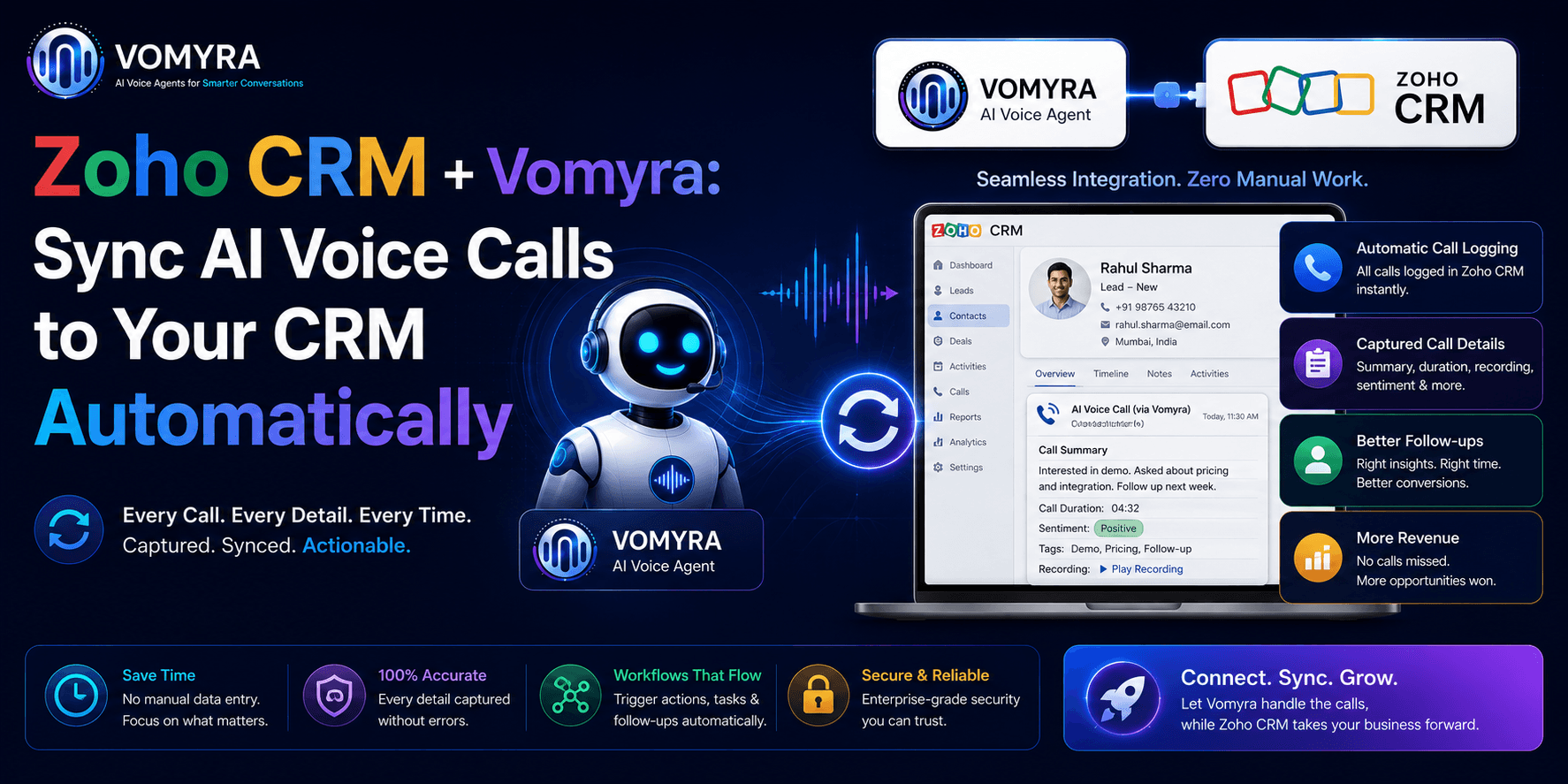
This is exactly the gap that automatic CRM call syncing is designed to fix. When an AI voice calling system connect directly with Zoho CRM, every call, every note, and every follow-up gets logged automatically, no manual data entry, no missed details, no relying on someone’s memory at the end of a long day. Vomyra built this integration specifically to solve that exact problem for growing businesses.
Why Manual CRM Updates Don’t Work Anymore
For small teams, manually updating a CRM after every call might seem manageable. But as call volume grows, this process breaks down fast.
Sales and support teams often skip logging minor details, forget to update lead status, or simply run out of time between back-to-back calls. Over weeks and months, this leads to a CRM full of gaps, missing context, incomplete customer histories, and outdated lead stages that don’t reflect what’s actually happening on calls.
The result? Follow-ups get missed, leads go cold, and managers lose visibility into what’s really happening with customers. None of this is due to a lack of effort, it’s simply an unrealistic expectation to manually document every single conversation with perfect accuracy.
What Automatic Syncing Actually Solves
When AI-powered voice calls sync directly with Zoho CRM, the entire process becomes hands-free. Here’s what typically gets automated:
Call Logging Without Manual Entry
Every call, whether inbound or outbound, gets automatically recorded in the CRM against the correct contact, with timestamps and call outcomes attached.
Automatic Lead Updates
Based on how a conversation goes, lead status can update automatically, moving a contact from “new lead” to “interested” or “follow-up required” without anyone manually changing a field.
Call Summaries and Notes
Instead of relying on a rep’s memory, AI-generated call summaries get added directly to the CRM record, giving the full team visibility into what was actually discussed.
Follow-Up Scheduling
If a call requires a follow-up, that task can be created automatically inside the CRM, reducing the chances of leads slipping through the cracks.
This kind of automation doesn’t just save time, it fundamentally changes how reliable your CRM data becomes. If you’re curious how AI handles the actual conversation side of these calls, this comparison on AI voice agent vs IVR differences explains how natural, intelligent calling works behind the scenes.

Why This Matters More for Growing Businesses
Small businesses and growing teams often don’t have the bandwidth for dedicated data entry roles. Every rep is usually juggling calls, follow-ups, and their own admin work simultaneously.
Automatic syncing removes an entire layer of manual work, letting teams focus on actually talking to customers instead of documenting conversations after the fact. It also means managers get a much clearer, real-time picture of what’s happening across the sales pipeline, without needing to chase reps for updates.
For businesses that have struggled with inconsistent CRM data in the past, this single change often has one of the biggest impacts on overall sales visibility and follow-up consistency.
Real Business Benefits
Here’s what businesses typically notice after connecting AI voice calling with their CRM:
- Higher CRM accuracy, since data is logged automatically instead of manually
- Faster follow-ups, because tasks and reminders are created without delay
- Better lead tracking, with clear visibility into every stage of a conversation
- Less admin work for sales teams, freeing up more time for actual selling
- Improved reporting, since managers can trust the data reflects what’s truly happening on calls
None of these benefits require a complete change in how a sales team operates. It simply removes the manual, error-prone parts of the process.
A Simple Example
Picture a small real estate agency handling dozens of inquiry calls daily. Without automation, agents often forget to log every call detail, especially during busy hours. Leads get missed, follow-ups get delayed, and management has no real visibility into what’s happening.
Now imagine every call automatically creates a CRM entry, updates lead status based on conversation outcome, and schedules a follow-up task without anyone lifting a finger. Suddenly, no lead falls through the cracks, and the entire team works from the same accurate, up-to-date information.
This same model applies across industries, healthcare clinics managing appointment inquiries, service businesses handling customer support calls, or educational institutes managing admission queries. Anywhere calls and CRMs intersect, this kind of automation makes a measurable difference.
To see how this fits into a broader affordable calling setup for growing businesses, this breakdown on affordable AI voice calling for Indian SMBs covers how businesses are building cost-effective, automated calling systems from the ground up.
What to Look for When Setting This Up
If you’re considering connecting your voice calling system with Zoho CRM, a few things matter most:
Reliable data mapping — Calls should map correctly to existing contacts, not create duplicate or disconnected records.
Real-time syncing — Updates should happen immediately after a call, not hours later through batch processing.
Clear call summaries — Notes should be genuinely useful, not just generic call logs with no context.
Easy setup — The integration shouldn’t require heavy technical work or ongoing maintenance from your team.
Getting these fundamentals right makes the difference between a helpful automation and one that just creates more clutter in your CRM.
Final Thoughts
Connecting AI voice calling directly with Zoho CRM solves a problem most growing businesses face quietly, incomplete, inconsistent call data that makes follow-ups harder and sales visibility weaker than it should be. By automating call logging, lead updates, and follow-up scheduling, businesses free up valuable time while actually improving the accuracy of their customer data.
For any team relying on phone calls to drive sales or support, this kind of automation isn’t just a nice-to-have anymore, it’s quickly becoming a standard expectation for businesses that want to stay organized as they scale.
FAQs
1. Does this integration work with any Zoho CRM plan?
It generally works across standard Zoho CRM plans, though specific features may vary by plan type.
2. Will old call records be affected during setup?
No, historical CRM data remains untouched; only new calls sync going forward.
3. Does every call get logged automatically?
Yes, both inbound and outbound calls are logged without manual input.
4. Can lead status really update automatically?
Yes, based on conversation outcomes, lead stages can update without manual changes.
5. Is this suitable for small sales teams?
Yes, it’s especially useful for smaller teams that lack dedicated data entry support.